
-
×
 Advanced Custom Fields Multilingual 2.1.3
1 × $4.49
Advanced Custom Fields Multilingual 2.1.3
1 × $4.49
Subtotal: $4.49
 29 Sold in last 24 hours
 $4.49
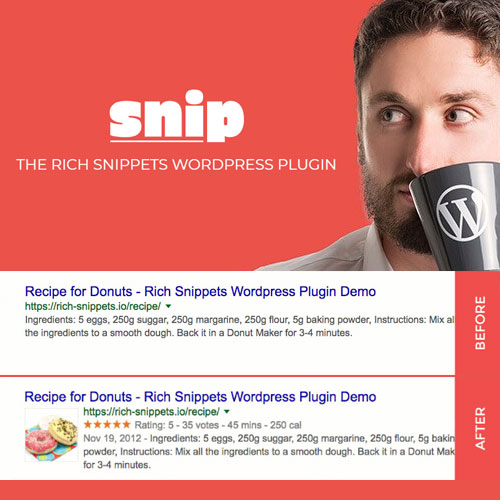
A Rich Snippet displays additional data such as images, star-ratings, etc. in search results. In order to get this to work, you must incorporate schema.org (in any of the following open standards: microdata, microformats or RDFa, and JSON-LD ) in your web pages. Sounds complicated? Yes, it is. At least for most people who don’t know how to code.
That’s why this the Rich Snippets WordPress Plugin is made for! In Version 2. no coding is needed. No single line. What you need is the basic knowledge of how schema.org works.
“Schema.org is a collaborative, community activity with a mission to create, maintain, and promote schemas for structured data on the Internet”. This is what the official website at schema.org says on its home page. The project was founded by Google, Microsoft, Yahoo and Yandex as a shared vocabulary to provide search engines and other applications with structured data. If you add some of the so called schemas to your website, search engines will have a better understanding of the things on your sites. For example, you can tell them:
Of course it is. schema.org is out for years now and has been tested very well. So it’s not a “hype” anymore. Search engines using it frequently as mentioned above:
A few years ago you would have needed at least a deep understanding of schema.org and how to add microdata to your HTML markup. Problems are:
Sounds nearly impossible, right? But I have a solution to that:
Use the Rich Snippets WordPress Plugin today and you don’t need a single line of code! Just a good understanding of how structured data works.
You must be logged in to post a review.

Wordpress Plugins

Wordpress Plugins

Wordpress Plugins

Woocommerce Plugins

Wordpress Plugins

Wordpress Plugins

Wordpress Plugins

Wordpress Plugins

Wordpress Plugins

Wordpress Plugins

Wordpress Plugins

Woocommerce Plugins
Reviews
There are no reviews yet.